RaspberryPi 5
约束:
- 具有WiFi或网线
- 使用RaspberryPi OS
烧写镜像
Raspberry Pi Imager(推荐)
Balena Etcher
Balena Etcher 是一个跨平台且,用户界面友好的镜像文件烧写工具。
-
下载Balena Etcher
选择合适的操作系统版本下载balenaEtcher
-
下载RaspberryPi OS
下载RaspberryPi OS到本地
-
打开Balena Etcher烧写镜像
-
将SD卡插入MicroSD 插槽内
需要注意,SD卡的朝向
配置网络
固定ip地址
auto eth0
iface eth0 inet static
address 192.168.137.36
netmask 255.255.255.0
gateway 192.168.137.1
WiFi配置
配置网络路由表
有限网络-路由器
有线网络-共享(仅限win)
使用网线一端连接树莓派一段连接电脑
打开网络连接面板
选择已经连接好网络的适配器,配置为共享
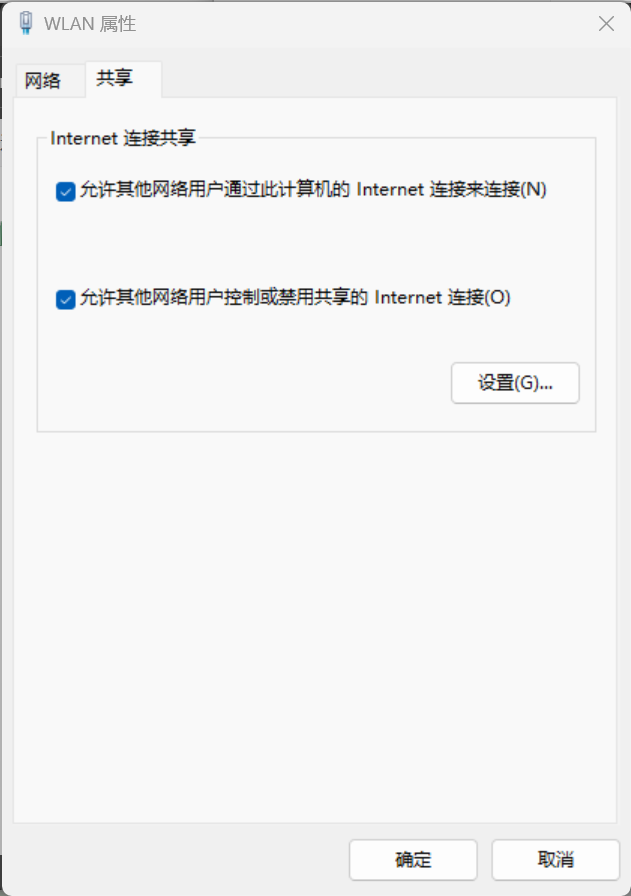
配制ap热点
interface=wlan0
driver=nl80211
ssid=rap
hw_mode=g
channel=7
wmm_enabled=0
macaddr_acl=0
auth_algs=1
ignore_broadcast_ssid=0
wpa=2
wpa_passphrase=87654321
wpa_key_mgmt=WPA-PSK
wpa_pairwise=TKIP
rsn_pairwise=CCMP
更换软件镜像源
debian软件源
编辑 /etc/apt/sources.list 文件。
# 默认注释了源码镜像以提高 apt update 速度,如有需要可自行取消注释
deb https://mirrors.bfsu.edu.cn/debian/ bookworm main contrib non-free non-free-firmware
# deb-src https://mirrors.bfsu.edu.cn/debian/ bookworm main contrib non-free non-free-firmware

deb https://mirrors.bfsu.edu.cn/debian/ bookworm-updates main contrib non-free non-free-firmware
# deb-src https://mirrors.bfsu.edu.cn/debian/ bookworm-updates main contrib non-free non-free-firmware

deb https://mirrors.bfsu.edu.cn/debian/ bookworm-backports main contrib non-free non-free-firmware
# deb-src https://mirrors.bfsu.edu.cn/debian/ bookworm-backports main contrib non-free non-free-firmware

# 以下安全更新软件源包含了官方源与镜像站配置,如有需要可自行修改注释切换
deb https://mirrors.bfsu.edu.cn/debian-security bookworm-security main contrib non-free non-free-firmware
# deb-src https://mirrors.bfsu.edu.cn/debian-security bookworm-security main contrib non-free non-free-firmware
树莓派专用软件源
编辑 /etc/apt/sources.list.d/raspi.list 文件。
deb https://mirrors.bfsu.edu.cn/raspberrypi/ bookworm main
风扇调速
Rockchip平台cpu散热风扇随温度自动调速的配置方法_pwm-fan-CSDN博客
硬盘自动挂载
打开/etc/fstab,在行尾添加下列语句:
UUID使用
blkid获取
UUID=6d4b63d9-dad3-41d2-b4bc-caa3a4727130 /mnt/disk1 ext4 defaults,auto,users,rw,nofail 0 0
重启后,即可看到硬盘自动挂载到了/mnt/disk1目录下了。
软件安装
安装docker
自动安装方式
Docker 提供了一个自动配置与安装的脚本,支持 Debian、RHEL、SUSE 系列及衍生系统的安装。
export DOWNLOAD_URL="https://mirrors.bfsu.edu.cn/docker-ce"
# 如您使用 curl
curl -fsSL https://get.docker.com/ | sh
# 如您使用 wget
wget -O- https://get.docker.com/ | sh
安装k3s
-
前提配置
cgroup_memory=1 cgroup_enable=memoryto /boot/cmdline.txt -
使用自动脚本安装
curl -sfL https://rancher-mirror.rancher.cn/k3s/k3s-install.sh | INSTALL_K3S_MIRROR=cn sh -